1. Export a CSV file from Krock.io
To export comments from Krock.io, select the video and open the menu via the three dot icon. Select "Export comments to csv" to export the comments.
2. Use the "Marker-converter" to convert the CSV file into a CSV file
Open the free Marker-converter, select "Krock.io > Comments (.csv)" and set "convert" to "CSV for Google Sheets". Generate and download the file. Heb je problemen bij het converteren van het bestand, dan kun je contact opnemen met de gratis support.
3. Import the CSV file into Google Sheets
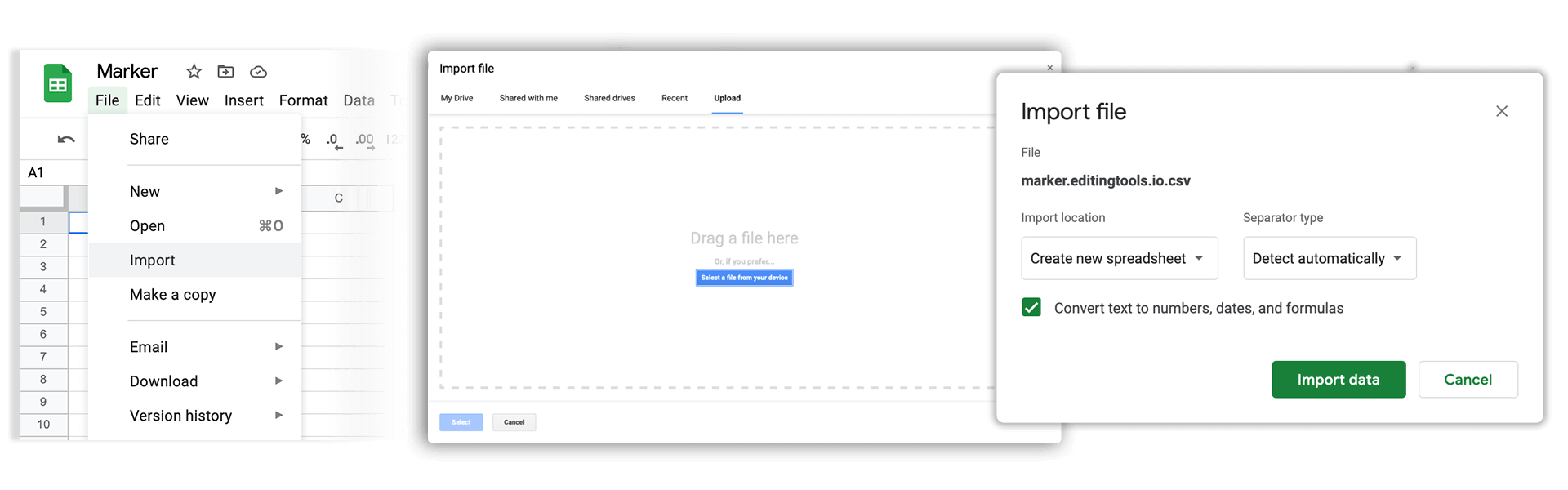
Open Google Sheets and go to "File -> Import". Upload the generated CSV file and press "Import Data" to generate the Sheet with all markers.
🚀 Klaar
Dat was het voor nu! Vond je deze tutorial nuttig, deel hem dan om ons te steunen. Heb je suggesties om de workflow te verbeteren, laat het ons weten!